
















One Call at 6.40pm
Kate has her car booked in for a service at 8am on Thursday. On Wednesday evening her manager moves a meeting, so she rings the workshop to ask for Saturday morning instead. She also wants to know whether the brake check her friend mentioned is part of the service or extra. The workshop closed at 5.30. The mechanics have gone home. Nobody is going to pick up.
This is a completely ordinary call. It is also a good test of business AI, because it has three parts that need three different kinds of ability. The Saturday hours are a fact. The brake check is a fact that depends on her booking. Moving the service is an action: something has to change in the workshop's calendar, and Kate has to know it changed. Whether AI helps here depends on which of those three things it can actually do.
The Same Call, Two Ways
Let's run Kate's call through two kinds of AI. The first is a simple chatbot, the kind many businesses added to their website or phone line a few years ago. It works from a script and a set of answers. The second is an operational AI agent, which has the same knowledge but can also use tools: it can look up a booking, read the calendar, make a change and send a message.
| Moment in the call | Simple chatbot | Operational AI agent |
|---|---|---|
| Greeting | "Thanks for calling. Our hours are 7.30 to 5.30 weekdays and 8 to 12 Saturdays." | "Good evening, Eastside Auto, this is Alex. How can I help?" |
| "I need to move my service" | "You can manage bookings online. I will text you a link." | Asks for her name, finds Thursday's 8am booking against her mobile number. |
| "Is Saturday free?" | "We are open 8 to 12 on Saturdays." | Checks the calendar live: "I have 8.30 or 10am on Saturday. Which suits?" |
| "Is the brake check included?" | "Please call during business hours for pricing." | Reads her booking and the price list: "Your logbook service includes a brake inspection. Pads would be quoted separately." |
| Making the change | Nothing changes. Kate has to do it herself, or ring back tomorrow. | Moves the booking to Saturday 8.30, frees Thursday 8am, confirms it back to her. |
| After the call | Maybe a transcript nobody reads. | Texts Kate a confirmation, and leaves the workshop a written summary with the outcome. |
Both of these are "AI" and both sound polite. But at the end of the chatbot call, nothing in the business has changed. Thursday's 8am slot is still taken, Kate still has to go online or ring back, and she may well book somewhere closer instead. At the end of the agent call, the job is done. Nobody in the workshop touched the phone, and the first thing the owner sees on Thursday morning is a freed slot and a note explaining why.
The finish line test
At the end of the conversation, has something in your business actually changed, correctly, with the customer told and a record left? If yes, you have an operational agent. If a person still has to do the work later, you have a chatbot, however natural it sounds.
The Five Parts of an Operational Agent
The difference is not the voice, or the size of the language model underneath. It is what the AI is connected to and what it is allowed to do. An operational agent has five parts, and a chatbot usually has only the first.
Knowledge
Your prices, services, hours, service area and policies, written down so it answers from your facts rather than guessing. Chatbots have this too.
Tools
The things it can go and do: read and write the calendar, look up a customer, send an SMS, post the outcome to another system. This is the part that makes it operational.
Rules
Your judgement, written as instructions. What counts as urgent, which jobs need a person, how far ahead it can book, what it must never promise.
Handover
A clean way to pass the caller to a person, with the context, when the call needs one. Or a booked callback if nobody is in.
A record
A transcript, a summary and the outcome of every call, so you can see what it did, check it, and fix the rules when it gets something wrong.
Tools are where most of the value sits, and where most of the setup work sits too. An agent that can read your calendar but not write to it can tell a customer Saturday is free, and then someone still has to book it. Our earlier explainer on what agentic AI really means on the phone puts this as the line between an AI that reads from your business and one that writes to it. Operational agents are the ones that write.
Why Chatbots Disappointed
Chatbots were sold on a number called deflection: the share of enquiries that never reached a person. The trouble is that deflection counts a customer who gives up the same as a customer who was helped. Kate's chatbot call scores as deflected. She did not speak to anyone. She also did not get what she rang for.
Customers noticed. In a Gartner survey of nearly 5,800 customers published in July 2024, 64% said they would prefer companies did not use AI in customer service, and the top worry was that it would make reaching a person harder. That is a verdict on the chatbot era: automation used as a wall in front of the business rather than a way to get things done. If AI on your phone line cannot finish the job, or get the caller to someone who can, it will be resented however good it sounds.
An operational agent changes the maths because it is measured on a different thing. The question is not whether the caller avoided a person. It is whether the caller's problem was solved, and whether the business had to do anything afterwards to make that true.
Where Business AI Is Heading
The big research firms have been clear about the direction. In March 2025 Gartner predicted that by 2029 agentic AI will autonomously resolve 80% of common customer service issues without human intervention, leading to a 30% reduction in operational costs. The key word is resolve. That prediction is about AI that does things, not AI that points people to a help page.
In June 2025 the same firm offered the other side. It predicted that over 40% of agentic AI projects will be cancelled by the end of 2027 because of rising costs, unclear business value or weak risk controls. It also warned about what it called agent washing: vendors relabelling chatbots, assistants and older automation as "agents" without real autonomy. Gartner estimated that only about 130 of the thousands of vendors claiming agentic AI actually offered it.
Read together, the message is simple. The technology is real, but a lot of what is sold under the label is not, and many projects fail because they start too big with no way of checking results. The fix for both is the same: pick one job, give the agent the tools that job needs, and check whether the job got done.
Which Jobs Need an Agent
Not every call needs an operational agent. If callers mostly want your hours or your address, a well written answer is enough. The case for an agent grows with the number of calls that end in "someone will get back to you". Here is how common calls sort out.
| Call type | A chatbot can handle it? | What an operational agent adds |
|---|---|---|
| Hours, location, parking | Yes | Little. A good answer is the whole job. |
| "Do you do X, and roughly what does it cost?" | Mostly | Can qualify the enquiry and book the quote visit on the same call. |
| New booking | Only by sending a link | Checks live availability, books it, texts the confirmation. |
| Reschedule or cancel | No | Finds the booking, moves or cancels it, frees the slot for someone else. |
| Message for a staff member | Takes a message | Takes the message, tags who it is for and how urgent it is, sends the summary. |
| Something urgent after hours | No | Triages against your rules and rings or transfers to the on-call person. |
| Complaint or sensitive matter | No | Should not try to resolve it. Captures the detail and gets it to a person quickly. |
If you want a longer list, our guide to which calls to automate with AI works through common call types by industry. The pattern is consistent: the calls that cost you money are the ones that need an action, and those are exactly the calls a chatbot cannot finish.
Guardrails That Make It Safe
Giving AI the ability to change things in your business is a reasonable thing to be careful about. The answer is not to avoid it but to set it up the way you would set up a new staff member: clear permissions, a few firm rules and a way to check their work.
- 1
Only the tools the job needs
A booking agent needs the calendar and SMS. It does not need your accounts or your supplier list. Keep each agent's access narrow.
- 2
Confirm before it commits
The agent reads the change back ("Saturday at 8.30, same car, same service?") and only saves it once the caller agrees.
- 3
Write down what it must never do
Quote a firm price for work it has not seen, promise a same day visit, give medical or legal advice, or argue with a caller. Put it in the rules in plain English.
- 4
Make "I do not know" a proper answer
When a question is outside its knowledge, a good agent says so and takes a message, rather than inventing something plausible.
- 5
Always a way to a person
A caller who asks for a human should get one, or a clear callback time. Warm transfers should carry the context so nobody repeats themselves.
- 6
Keep and read the record
Every call transcribed, summarised and tagged with an outcome. Read a handful each week at first. It is how you find the rule you forgot to write.
There is a legal angle too. From 10 December 2026, businesses covered by the Privacy Act must explain in their privacy policy when they use personal information in automated decisions that could significantly affect people. Most booking and message taking will not reach that bar, but it is worth checking. Our guide to the Privacy Act automated decisions change explains what to look at.
How to Measure It
If you remember one thing from this article, make it this: measure resolution, not deflection. The numbers worth tracking are simple, and a decent phone system will give you all of them from the call records.
| Measure | What it tells you | What good looks like |
|---|---|---|
| Resolved on the call | Share of calls where the caller's request was completed with nothing left for staff to do. | Rising month on month as you add tools and rules. |
| Handed to a person | Share of calls passed to staff, and why. | Stable, with clear reasons. Zero is a warning sign, not a win. |
| Rework | How often staff had to fix something the agent did. | Low, and each case turned into a new rule. |
| Callers who hang up early | People who gave up in the first 30 seconds. | Falling. A spike usually means a confusing greeting. |
| Jobs booked after hours | Revenue the business would otherwise have missed. | The number to take to your accountant. |
Rework is the one most people forget: an agent that books ten jobs and gets two wrong has created two problems. For the wider picture of phone metrics, see our guide to contact centre metrics, where first contact resolution plays the same role for people that resolution plays for AI.
Your First Operational Agent
The businesses that get value from AI agents tend to start small and specific. The ones that end up in Gartner's 40% tend to start with "let's automate customer service". Here is a plan that works for most small and medium businesses.
| Week | What to do |
|---|---|
| Week 1 | Pick one job that ends in an action, such as after hours bookings or rescheduling. Write the rules the way you would brief a new receptionist. |
| Week 2 | Connect only the tools that job needs, usually the calendar and SMS. Test it yourself with twenty calls, including awkward ones. |
| Weeks 3 and 4 | Put it on the after hours line first. Read the summaries every morning and fix the rules as you go. |
| Month 2 | Compare resolved calls, handovers and rework against the missed calls you had before. Decide whether to extend its hours or add a second job. |
Our AI agent deployment guide goes deeper on rollout, and our cost and ROI guide helps you put a dollar figure on the missed calls you are trying to recover.
How Uniden Voice AI Agents Work
Uniden Voice AI Agents are built to be operational from the first call. They answer on your own business numbers, inside the same Australian phone system as your desk phones and apps, so there is no call forwarding to a separate service and no second number. In Agent Studio you give each agent a personality, the knowledge it needs, the skills it performs and the tools it is allowed to use, such as your calendar and SMS. It can answer the question, book or move the job, text the customer a confirmation and warm transfer to your team when a person is needed.
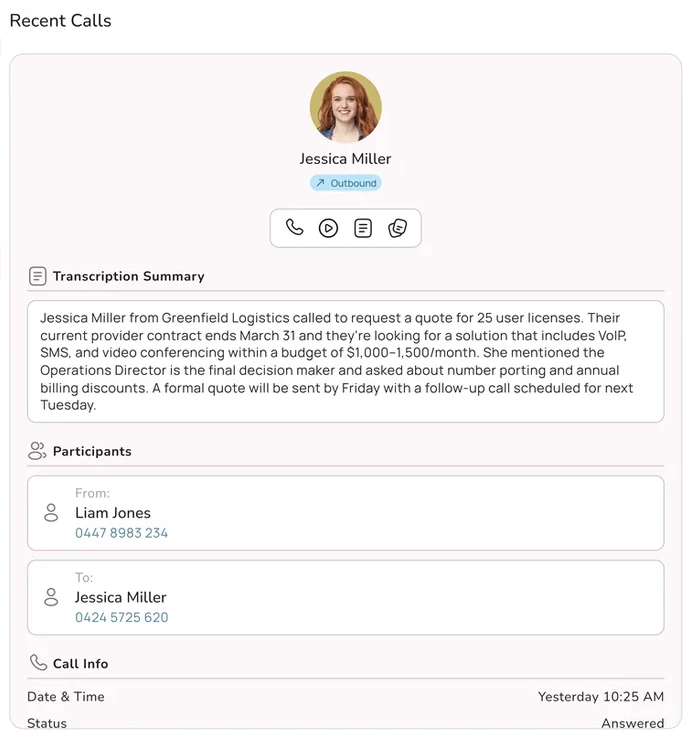
Every call is transcribed, summarised and tagged with an outcome, so you can see what the agent did and check its work. You can run more than one agent on the same account, say one for reception, one for after hours and one for bookings, and the platform, the AI and the support all come from one Australian provider. When something needs changing, you call one number and talk to a team in Australia who can see your setup.