


















Plenty of Australians have picked up a Uniden cordless phone at home or at the shop counter at some point. The brand has been part of everyday Australian life since 1966, and for most of that time a phone meant a handset, a socket on the wall and a pair of copper wires running back to the exchange. That arrangement is close to finished. The cable in the wall has changed, the bill has changed, and what a business phone can do has changed most of all. This guide is written for owners and office managers who want a straight answer: what you are actually comparing in 2026, the real trade-offs, and what we would do in your position.
What Is Really Plugged Into Your Wall
Start with the part most comparisons skip. Many businesses say they "have a landline" when what they have is something different. Under the National Broadband Network rollout, the old copper Public Switched Telephone Network has been switched off area by area, and the ISDN services that used to feed office switchboards have been decommissioned. Premises right across the country have been moved off copper. Voice now travels over internet infrastructure whether or not anyone calls it VoIP.
So if you walk to the back room and follow the cord from your desk phone, there is a good chance it ends at an NBN modem or a voice port on a router, not a copper socket fed from the exchange. That service may be labelled a "home phone" or "business line" on your bill, but technically it is already internet-based voice, usually with very few of the benefits. In other cases, a business is still on an old copper or ISDN arrangement that is simply waiting for its turn to be cut over.
Either way, the comparison is lopsided before it starts. You are not choosing between two long-term options. You are choosing between a legacy service on its way out and a modern platform that keeps improving. Asking for a brand-new genuine copper line for a business is generally not possible the way it was ten years ago.
Move Before Someone Else Picks the Date
An old copper line or a PBX hanging off ISDN is not a safe holding pattern. When the disconnection notice arrives, you end up rushing the number port, buying gear in a hurry and training staff on the fly. Choosing your own week to switch gives you time to test, run old and new side by side, and keep every number. A planned move is calm. A forced one rarely is.
1966
year Uniden started serving Australian homes and businesses
1870s
origins of the copper phone network that is now being retired
Minutes
to add a new VoIP user, with no technician visit
100%
of Uniden Voice Over Cloud calls handled on Australian servers
Copper Circuits and Data Packets, Explained Simply
You do not need an engineering degree for this, but a quick picture of each makes the rest of the guide easier to follow.
A copper line is a reserved road
The traditional PSTN dates back to the late nineteenth century. When you dial on a copper line, the exchange sets aside a physical path, a pair of wires, between you and the person you are calling. Your voice travels down it as an electrical signal, and nobody else can use that path while you are talking. It is a simple, sturdy design, and because the exchange sent a small current down the wire, an old phone plugged straight into copper would usually keep working in a blackout.
Mid-sized offices often ran ISDN instead, which squeezed several digital voice channels onto one service so a PBX switchboard could run a dozen or more extensions. For years that was the standard setup for an Australian office with a receptionist. But PSTN and ISDN were both built for one job. They carry voice calls. That is the full list.
VoIP is traffic on a highway you already pay for
VoIP, short for Voice over Internet Protocol, chops your voice into small digital packets and sends them across the same internet connection that handles your email and accounting software. The far end puts them back together as sound. There is no reserved road; the call shares your existing connection with everything else.
Since the call is only data, it can sit alongside a video meeting, a text message, a shared screen or a chat with an AI agent, all inside the same app. And because the system itself runs as software in the provider's data centre, nobody needs to visit your office to change how calls are handled. When people talk about a cloud phone system, this hosted style of VoIP is what they mean.
If You Remember One Thing
A copper landline is a wire that does phone calls and nothing else, fixed to one building. VoIP is software that rides on your internet service, so your number, your call rules and your extra tools go wherever your staff go.
Where the Money Goes Each Month
Owners usually ask about price first, so let's be specific about what you pay for with each option rather than quoting headline numbers that rarely match the real invoice.
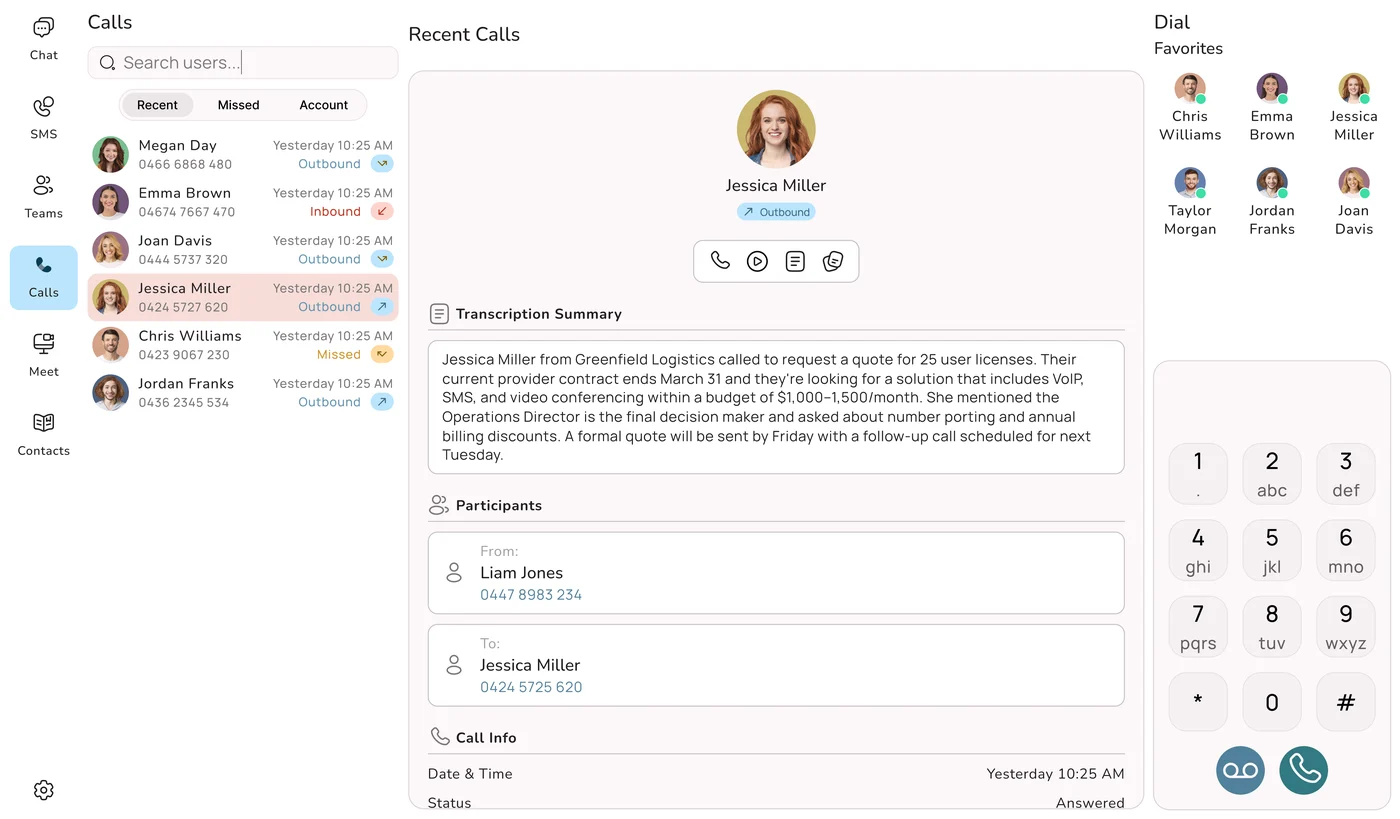
Keeping a traditional setup
Picture a typical small office running on old-style lines. Each line or channel attracts monthly rental, charged whether the phone rings or not. Calls are often metered, with separate rates for local, national, mobile and overseas calls, which makes the bill jump around from month to month. With more than one or two handsets you need a PBX in a cupboard, which means money up front, a maintenance agreement and a callout fee every time a handset or card fails. Then the handy extras, such as voicemail sent to email, recording, hunt groups and additional numbers, are often charged one by one. Growing means more lines, more cards in the PBX and more technician visits.
Running a cloud VoIP system
Most of those line items disappear. With VoIP you generally pay a per-user monthly fee. Calls go over the internet connection you already have, so there is no line rental, and the switching happens in the provider's cloud, so there is no PBX to buy or service. National calling is commonly unlimited or very low cost, which flattens the bill. And the features that cost extra on a traditional system, like IVR menus, call recording, voicemail-to-email and mobile apps, are normally part of the plan. Add the whole thing up and VoIP almost always comes out cheaper, and a lot easier to forecast. Our guide to business phone system costs in Australia goes through each cost line in detail.
The Four Savings Most Offices See
Line rental gone: your internet service carries the calls, so per-line fees drop off the bill.
No switchboard spend: there is no box in the cupboard to buy, repair or replace.
Extras bundled: recording, IVR, voicemail-to-email and apps come with each user rather than as add-ons.
Costs that follow headcount: add a seat when you hire and remove it when someone leaves. Uniden Voice Over Cloud bundles 50+ features and AI call agents into its per-user pricing, with no minimum number of users.
Bad Days: Blackouts, Dropouts and Floods
This is the objection we hear most, and it is a fair one, so it gets a proper answer. The traditional case for copper is that it kept going in a power cut because the exchange powered the line. VoIP needs mains power for the modem, router and phones, plus a working internet connection. Lose both and that site's connection goes quiet. Nobody should pretend otherwise.
The copper advantage has mostly gone already
Once your premises is on the NBN, your phone service relies on powered equipment on site anyway. So the old promise that "the landline always works in a blackout" no longer applies to most businesses, even the ones still paying for something called a landline. The copper network that made that possible is the very thing being retired.
Think about where the number lives
Here is the part that surprises people. A copper number is anchored to a building. If that building floods, burns, loses its line during roadworks or simply has a long power outage, the number is stuck there and callers hear nothing useful. A cloud number sits in the provider's data centre. When your office drops out, the system keeps running and sends calls somewhere else: to staff on the mobile app, to another office, or to an AI agent that takes a message or books a job. Your customers get answered. Something that would have shut a copper office for the day becomes a minor inconvenience.
A sensible backup kit
The internet and power dependency is cheap to cover. For most small and mid-sized offices, this list does the job:
- Diversion to mobiles: staff already carry the app, so calls keep flowing over mobile data when the office connection is down. No extra hardware.
- A 4G or 5G backup service: a mobile broadband failover unit picks up automatically if the fixed service drops, so desk phones stay online.
- A small UPS: a battery unit on the modem, router and network switch rides through short blackouts, giving your whole connection the kind of staying power copper once gave a single phone.
- Failover rules in the system: tell the platform where calls should go if a handset or a whole site cannot be reached, whether that is a mobile, another team or an AI agent.
Put those four pieces in place and a cloud system ends up more dependable than a single copper line, because it has more than one path to reach your people.
Ask the Better Question
Instead of "does VoIP need power?", ask "where do my calls go when the office is out of action?" With copper the answer is nowhere. With a cloud system it is wherever you set it. Uniden Voice Over Cloud diverts calls to staff mobile apps automatically, so one site going down does not take the business off the phone.
How Calls Actually Sound
Some people still picture internet calls as choppy and robotic. That reputation comes from early VoIP on slow, crowded connections. On a reasonable business connection in 2026, the reverse tends to be true.
Copper calls use narrowband audio, which trims off much of the voice range. That is why voices on an old line sound a little boxy and why "f" and "s" are easy to mix up when someone spells an email address. Modern VoIP uses HD wideband codecs that carry a wider slice of sound, so speech is clearer and closer to a face-to-face conversation. With adequate bandwidth and a stable connection, VoIP calls sound as good as copper or better.
Distance to the servers matters more than the codec
Voice is live, so delay is the enemy. If your call has to travel to a server in the United States, Europe or Singapore and come back, every packet picks up extra milliseconds. A fraction of a second is enough for people to start talking over each other or leaving awkward gaps. A slick demo can sound great, then feel laggy once real calls are crossing an ocean.
Keeping the servers in Australia fixes that. Calls stay onshore, delay stays low and conversations feel natural. Your recordings, transcripts and call records also stay in the country, which sits comfortably with the Privacy Act 1988 and the Australian Privacy Principles. That is why Uniden Voice Over Cloud is hosted entirely on Australian servers. In our experience it is the biggest single difference between VoIP that sounds excellent and VoIP that is only passable.
What Changes at the Front Desk
A copper line, even with a decent switchboard behind it, gives you calls, transfers, hold music and voicemail. A cloud system treats the phone as one part of a bigger set of tools. Here is how that plays out for the person answering the phone and for you as the owner.
Smarter Call Handling
Both options make calls. On VoIP, menus, queues, hunt groups and time-of-day rules are set in software, and callers hear clearer HD audio.
Video When You Need It
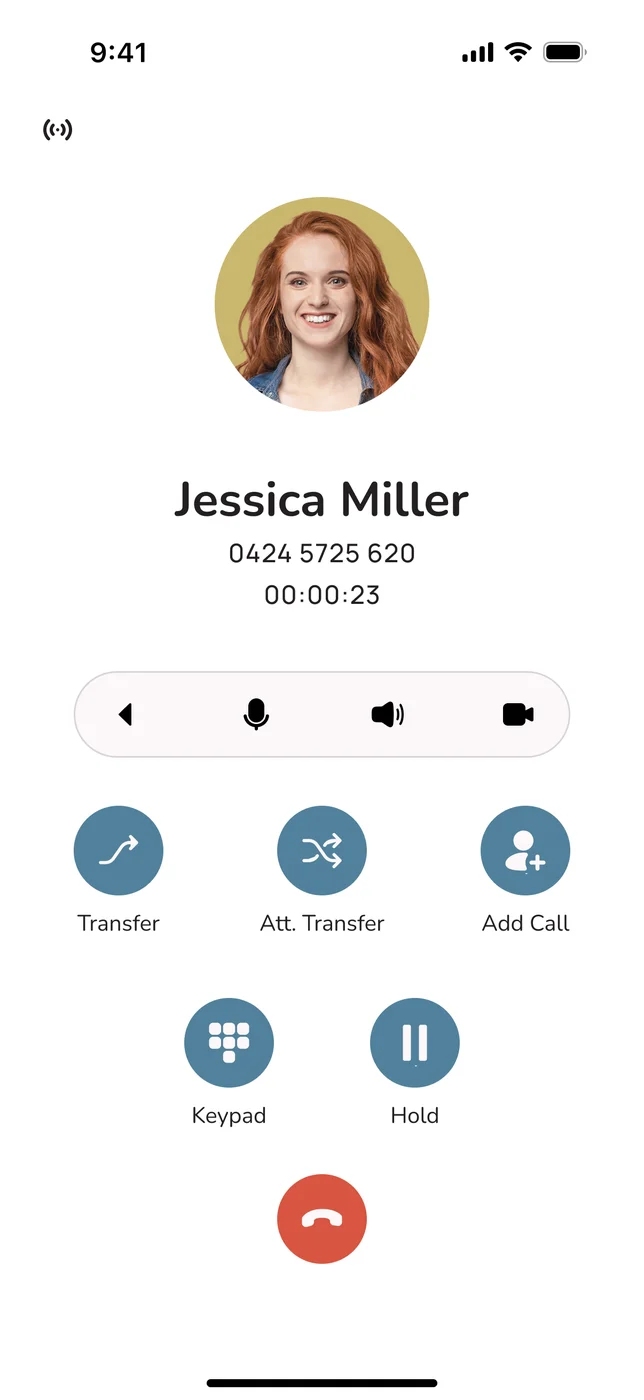
Jump from a call to a video meeting with a client or a staff member in the same app. Copper has no way to do this.
Texts From the Business Number
Send booking reminders, confirmations and quick replies from your main number, not someone's personal mobile.
Apps on Every Device
Android, iOS, Windows, Mac and Linux apps carry the business number and its settings, so staff are not chained to a desk.
AI That Answers
AI call agents pick up, ask the right questions, route the call or book the job, in natural Australian voices, at any hour.
Links to Your Software
Connect calls to Xero, MYOB, Salesforce, HubSpot, Zoho and others so each conversation lands on the right customer record.
Numbers You Can Use
A dashboard of call volumes, missed calls and answer times, instead of an itemised bill that tells you very little.
Notes Written for You
Live transcription, short call summaries and voicemail turned into text, so details are not lost between shifts.
See Who Is Free
Presence and team chat show who is on a call or available, so transfers go to someone who can actually pick up.
You will not switch all of this on in the first week, and you do not need to. The point is that copper can never add any of it, while a cloud platform lets you turn things on as the business needs them, without new hardware. AI answering is the clearest example. On copper it is not even a concept. On a modern cloud system it is part of the package. If after-hours calls are where you lose work, have a look at Uniden Voice AI Agents.
Hiring, Moving and Opening Another Site
Very few businesses stay the same size and shape for long. You take on casuals for the Christmas rush, open a second shopfront, let the bookkeeper work from home two days a week or move to a bigger warehouse. Each of those changes has a phone cost attached, and that is where the two options are furthest apart.
On a traditional setup, growth is a job for a technician. A new starter can mean another line, more PBX capacity, possibly new cabling and a handset, and the lead time can run to days or weeks. A second location usually means a second system or an expensive link between the two. Moving premises can leave you waiting on line connections at the new address while customers ring a disconnected number.
On VoIP, growth is a few clicks. You add the user in the admin portal and they are making calls on the free app straight away, before any desk phone arrives. A new site needs an internet connection and not much else. Hybrid staff use the same number and the same call rules whether they are in the office, at home or on the road. When you move, the system moves with you, because it was never in the building in the first place. For a business that is growing, that flexibility is often worth more than the monthly saving.
"Now that I am using the mobile application I can stay connected with my business when I am out of the office. Having features like this, which are usually only available to larger companies, in a cost-effective manner is excellent." Marie-Claire, Owner, Wealth of Health
Your Numbers Come With You
The number on your van, your website and your old business cards has real value, and the worry about losing it stops a lot of owners from switching. You do not lose it. Moving a number from one provider to another is called porting, and it is routine.
Ordinary geographic numbers, mobiles and 1300 and 1800 numbers can all be ported. You give your new provider a recent bill and the account details, they lodge the request with your current carrier, and the number moves across. You do not need to touch any settings. The detail that matters most is timing: in a properly run port, the current service keeps working until the new one takes over, so there is no gap where callers get a dead line. From the customer's side, nothing happens at all.
What a Good Port Looks Like
Every number moves: fixed, mobile, 1300 and 1800 numbers can come across together.
No dead air: the old service stays live right up to the cutover, so calls keep arriving.
Someone else does the paperwork: your provider deals with the losing carrier for you. Uniden Voice Over Cloud runs the whole port and is offering free porting for a limited time.
The Handset Question
A lot of people assume VoIP means giving up proper phones and talking into a laptop. It does not. You can run everything from the free apps if that suits your team, but plenty of offices still want a real handset on the desk, especially at reception, and that is a perfectly good choice.
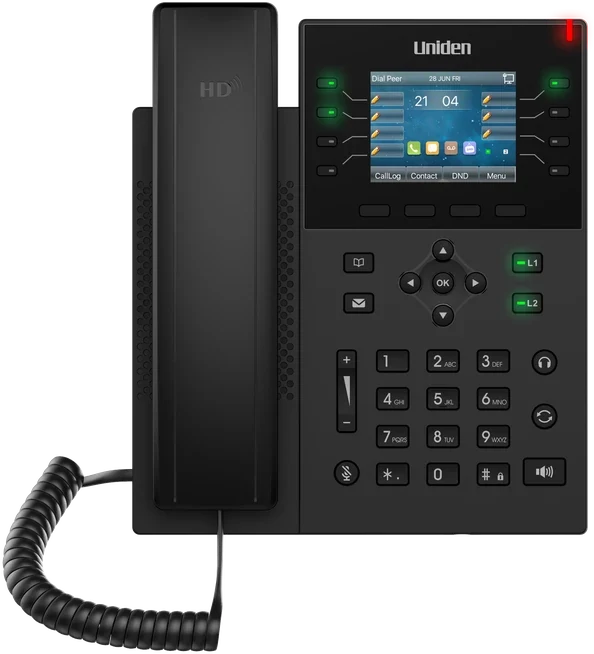
This is where Uniden's background shows. Uniden Voice Over Cloud works with the Uniden EVOC2 HD desk handset, along with conference phones for meeting rooms and headsets for staff who are on calls all day. If you would rather not think about hardware at all, there is a phone in a box option that arrives ready to plug in. And because a VoIP system is only as good as the connection under it, you can also bundle a business nbn plan so the internet and phones come from one place, with one support number to ring.
The practical upshot is that the switch can look almost identical from the receptionist's chair. Same number, a familiar-feeling handset on the desk, and a lot more going on behind it.
The Scorecard
Here is everything above in one place. Each row is a question a business owner tends to ask, with the answer for an old copper or ISDN service and for a cloud VoIP system such as Uniden Voice Over Cloud.
| Question you are asking | Copper line or ISDN | Cloud VoIP (Uniden Voice Over Cloud) |
|---|---|---|
| Can I still order it for a new office? | ✗ Being retired as part of the NBN | ✓ Standard for new connections |
| What do I pay every month? | ✗ Rental on each line, plus metered calls | ✓ A per-user fee with national calls included |
| What do I buy up front? | ✗ A PBX and cabling | ✓ Nothing required; apps are free, handsets optional |
| How do calls sound? | ✓ Fine, but narrowband | ✓ Clearer HD wideband |
| Can staff answer on their mobile or laptop? | ✗ Desk phone only | ✓ Free apps for every major platform |
| Can I text customers from the business number? | ✗ | ✓ Yes |
| Can I hold a video meeting? | ✗ | ✓ Yes, from the same app |
| Can it answer calls when nobody is free? | ✗ Voicemail at best | ✓ AI call agents included |
| Does it talk to my CRM or accounts? | ✗ | ✓ Xero, MYOB, Salesforce, HubSpot and more |
| How hard is adding a new starter? | ✗ Technician visit and hardware | ✓ Minutes in the admin portal |
| What about a power cut? | ~ Old copper only; NBN services need power too | ✓ Calls divert to mobiles; UPS and 4G backup available |
| What if the office is out of action? | ✗ The number is stuck at the building | ✓ The number lives in the cloud and calls are redirected |
| Do I keep my number? | ✓ It is already yours | ✓ Ported for you, with no downtime |
| Who helps when something breaks? | ~ Legacy carrier support queues | ✓ Australian team, 24 hours a day |
Read down the columns and the result is plain. The two things copper used to have going for it, being available everywhere and staying up in a blackout, have either disappeared with the retirement of the network or been beaten by a system that diverts calls around a problem. On every other row, VoIP comes out ahead.
Lines You Should Not Rush
A fair guide should be clear about the exceptions. There is a short, shrinking list of services where a dedicated fixed line, or a carefully matched replacement, still deserves attention before you change anything.
- Lift phones and alarm lines: emergency phones in lifts, back-to-base security and fire alarms, and personal medical alarms were often installed and certified on copper. Treat them as their own project with the device supplier. Most are moving to internet or mobile-based options as copper goes, but they need checking, not guessing.
- Older EFTPOS and fax-based equipment: a payment terminal or a process that dials out over a phone line may need upgrading or reconfiguring rather than simply moving across with the port.
- Sites with weak internet and no mobile signal: if a location has unreliable fixed internet and no mobile coverage to fall back on, the internet dependency is harder to cover. These spots are becoming rarer as fixed wireless and mobile coverage grows.
Notice that none of these is about how you answer customers. They are specific devices or unusual locations. They are not a reason to leave your main business phones on copper, and with the network being retired, even these services are heading toward internet-based replacements.
Split the Job in Two
You do not have to move everything on the same day. Shift your everyday calling to VoIP first, which is where the savings and features are, and handle the lift, alarm or EFTPOS lines as a separate planned step with the equipment suppliers. The Uniden Voice Over Cloud local support team can help you list what is connected and decide the order.
Our Verdict, and Where Uniden Voice Fits
For nearly every Australian business in 2026, VoIP is the right call and the one that will still make sense in five years. It is cheaper to run, it does far more, it grows with you in minutes, your numbers come with you, and with mobile diversion and a 4G backup it copes with outages better than a single copper line ever did. On top of that, the copper network is being retired regardless of what you decide. Switching is not a gamble; it is catching up with where the network has already gone.
So the real decision is which provider. The things that separate a good one from a frustrating one rarely appear in a feature list: where the servers are, whether AI is included or sold as an extra, who picks up when you ring support, and whether the pricing is easy to understand. Here is how Uniden Voice Over Cloud answers those.
A Name You Already Know
Uniden has been a household brand in Australia since 1966. Uniden Voice Over Cloud is its business phone system, built and 100% hosted in Australia, so calls stay quick and your data stays onshore.
AI Agents in the Plan
AI call agents trained on your own business information, speaking with Australian voices, come with the platform rather than as a surprise extra.
Pricing You Can Follow
One per-user price covering 50+ features and AI. No minimum number of users, plus free demos and installation.
Real Uniden Hardware
The EVOC2 HD desk handset, conference phones and headsets, or a ready-to-go phone in a box, for teams that want a proper phone on the desk.
Porting Handled
Bring your fixed, mobile, 1300 and 1800 numbers. Porting is free for a limited time and your current service stays on until the cutover.
Local Help, Day and Night
An Australian support team available 24 hours a day and a dedicated account manager for every client. No offshore call centre and no do-it-yourself setup.
Put simply, moving from a landline to Uniden Voice Over Cloud is a known quantity. Your number stays put, the phones on the desk can carry a brand you recognise, a local team runs the migration, and you are off a network that is being shut down anyway. It is a change you will have to make sooner or later, so you may as well make it on your schedule and with people who answer the phone.
"Uniden Voice Over Cloud perfectly complements our billing software. The ease of integration with our billing software and great local support improved our own customer interactions and now many of our customers have made the switch." Chris, Operations Manager, PracBill
Common Questions
Further Reading
Now that the landline question is settled, these guides help with the next steps: picking a system, understanding how the cloud side works, setting a budget and putting AI to work on your calls.