




















Start With the Bill You Already Pay
Most owners who ask what a phone system costs are really asking a second question: will a new one cost more or less than what I have now? So before you look at any provider's pricing page, pull out your last three phone invoices. Add up the line rental, the call charges, any maintenance contract on the old system, the 1300 or 1800 number fees, and whatever you pay the technician who comes out when the system plays up. That total is your baseline, and it is the only number that tells you whether a change saves money.
Plenty of businesses are surprised by what turns up. An old PBX in the comms cupboard may still carry a support contract. A line kept "just in case" might be billing every month. Call charges that used to be small can creep up as more staff ring mobiles. None of this shows on a glossy price list, but all of it belongs in the comparison.
With your baseline in hand, the market itself is fairly easy to describe. Nearly every system sold in Australia in 2026 is hosted in the cloud and billed as a monthly fee per user. Basic plans start around $10 to $20 a user, the plans most businesses end up on sit around $25 to $35, and premium tiers go to $35 to $50 or higher. On those numbers a five-person office would typically budget in the region of $100 to $200 a month, and a 25-person business something like $600 to $1,000 a month, with the spread driven mostly by what is bundled and what is charged as extra.
Treat every figure in this article as an illustrative range for budgeting and for testing quotes against, not as a fixed price. Real costs move with the provider, your call volume and the contract. The goal here is to show you where the money goes so you can ask better questions.
$25 to $35
per user, per month: where most full-featured cloud plans land (illustrative)
$8k to $30k+
upfront for an on-premise PBX, before maintenance and lines
15 to 20%
of hardware cost, each year: a common on-premise maintenance contract
1966
Uniden, a household name in Australia since 1966
Budget in Three-Year Totals, Not Monthly Rates
A phone system is something you live with for years, so judge it over years. The cleanest way to compare a system you buy outright with one you rent monthly is to put both on a three-to-five-year timeline and add every cost that will land in that period. Comparing a one-off hardware price with a monthly subscription, as many people do, gives you an answer that is simply wrong.
Owning the box: where the on-premise money goes
The purchase price of an on-premise PBX covers the unit and its licences, the desk handsets, cabling and installation. That is the part people remember. The parts they forget come later: SIP trunks or line rental, a yearly maintenance agreement that commonly runs at 15 to 20% of the hardware price, software updates, and call-out fees whenever something fails. Somewhere between year five and year ten the hardware is due for replacement and the cycle starts again. There is also a cost you cannot invoice: when the building loses power or the internet drops, the phones stop until someone fixes it on site.
A quick illustration using the same assumption as the quote below. Say a business spends $12,000 on a PBX and signs a maintenance agreement at 15% of that. The agreement alone is $1,800 a year, or $5,400 over three years, before a single line or call charge. The box has not got any newer in that time, either.
Renting the service: where the cloud money goes
With a cloud system there is little or nothing to buy up front. The apps are free and handsets are optional. You pay a predictable fee per user, and maintenance, security patches, updates and uptime are the provider's job. Adding a new starter is a change in a portal, not a project. If your office loses power or internet, calls are sent to staff mobile apps automatically, so customers still get through. You never own the platform, which suits most businesses fine, because owning a phone system mostly means owning its problems.
| Over a three-year budget | Buy an on-premise PBX | Subscribe to cloud (e.g. Uniden Voice) |
|---|---|---|
| Day one spend | ✗ $8,000 to $30,000+ for hardware, licences, install | ✓ Nothing compulsory, apps are free |
| Every month | ~ Lines or SIP trunks plus maintenance | ✓ One per-user fee you can forecast |
| Updates and fixes | ✗ Paid contract or call-outs | ✓ Part of the subscription |
| New starter or departure | ✗ Hardware and licence change | ✓ Done in minutes |
| End of life | ✗ Replace every 5 to 10 years | ✓ Nothing to replace |
| Power or internet outage | ✗ Phones down until fixed on site | ✓ Calls diverted to mobile apps |
| After the copper switch-off | ~ Needs a SIP retrofit to keep working | ✓ Designed for the NBN |
| AI answering calls | ✗ Not an option | ✓ Included with Uniden Voice |
For most Australian businesses, the cloud comes out ahead on that three-year view, and the margin grew once the copper PSTN and ISDN services were retired under the NBN migration. On-premise systems were designed for those old lines. Keeping one alive today means paying for a SIP retrofit while still carrying all the upkeep. Our guide to hosted PBX vs on-premise PBX goes through that decision in more detail.
Putting Two Very Different Quotes Side by Side
Imagine a $12,000 on-premise quote next to a cloud quote of $30 per user for a team of ten. On the surface one is a big number and one is small. Run the cloud quote over five years and it comes to roughly $18,000 in subscription fees. That sounds higher until you remember the on-premise figure still needs maintenance, line rental and eventually new hardware added to it, while the cloud figure has no upfront spend and none of those extras. Only once both are on the same timeline do you have a fair contest.
How Phone Systems Are Sold in Australia
Quotes arrive in three shapes. Knowing which shape you are holding stops you comparing apples with oranges.
Per user, per month. The standard for any cloud phone system today. Each staff member is a seat with their own number, apps and features, and the bill moves up or down as your headcount does. It turns the phone system into a running cost rather than an asset purchase. The thing to check is whether the provider makes you buy a minimum number of seats, because that quietly penalises sole traders and very small teams.
Per line or per channel. A pricing style left over from ISDN days, where you pay for how many calls can happen at once rather than how many people you have. Four channels shared by ten staff can look like a bargain, until the fifth caller hears an engaged tone. Sizing it correctly is guesswork, and it is disappearing along with the copper network it grew up on.
Buy it outright. The on-premise model covered above: a capital purchase you own and depreciate, plus all the running costs that follow. Full control and no per-user fee, at the price of a steep upfront bill and a higher total over time for most businesses.
What Each Price Band Actually Buys
Cloud providers usually sell two or three tiers. The tier is where much of the real price is decided, because features a business relies on day to day are often reserved for the more expensive plans. Rather than list the tiers, the table below starts from the features and shows where you would typically find each one. The prices are illustrative.
| Feature | Entry plan ($10 to $20) | Business plan ($20 to $35) | Premium plan ($35 to $50+) |
|---|---|---|---|
| Calls, voicemail, forwarding | ✓ Yes | ✓ Yes | ✓ Yes |
| IVR menus and call queues | ✗ Usually not | ✓ Usually | ✓ Yes |
| Business SMS | ✗ Usually not | ~ Often | ✓ Yes |
| Call recording | ✗ Paid extra | ~ Varies | ✓ Usually |
| CRM and accounting integrations | ✗ Paid extra | ~ Some | ✓ Most |
| Advanced analytics | ✗ No | ✗ Usually extra | ✓ Yes |
| AI call agents | ✗ No | ✗ Paid extra | ~ Often still metered or per seat |
| Uniden Voice Over Cloud | One per-user price: 50+ features, AI call agents, integrations and apps all included, no minimum users | ||
Read down the AI and recording rows and the pattern is obvious. The lower the advertised tier, the more of the useful features are removed and then sold back as extras. A business on a $15 entry plan that adds recording, two integrations and AI can easily end up spending more than it would on a $30 plan with everything included, and with a messier invoice to reconcile each month.
Price the Plan You Will Really Use
The entry tier exists to get your attention. The features you will need by the second month usually sit a tier or two higher, or are sold as add-ons. When you build your budget, price the plan that covers everything on your list, not the cheapest plan on the page.
The Extras That Turn a $15 Plan Into a $48 One
Here is a simple sum that explains most surprise bills. A platform advertises $15 per user. AI costs another $15, call recording $8, and integrations $10. That platform is really $48 per user, more than an all-inclusive competitor charging $30. Each extra on its own looks small, which is exactly why a stack of $10 to $30 add-ons can double the per-user cost without anyone noticing until the invoice arrives. Below are the usual suspects, and the question to ask about each.
AI Answering
The add-on most likely to be metered. Ask: is AI part of my plan, charged per seat, or billed per minute of conversation, and is there a cap?
Recording and Storage
Often an extra, sometimes with a separate storage charge. Ask: is recording included, and how long are recordings kept before I pay more?
Software Connections
Links to Xero, MYOB, Salesforce or HubSpot are often held back for higher tiers or charged per connector. Ask: which of my tools connect natively on this plan?
Calls and Inbound Numbers
"Unlimited" may cover local and national calls only, with 1300 and 1800 inbound billed separately. Ask: what exactly does unlimited include?
Reports and Dashboards
Call logs are normally free; proper reporting often is not. Ask: what reports come with the tier you are quoting me?
Text Messages
Business SMS may be bundled or charged per message. If you send booking reminders or confirmations, ask for the message price in writing.
AI deserves special attention. Per-minute AI billing can be the worst shock of the lot, because a busy month of AI-answered calls can cost more than the base subscription. That is why AI business phone systems should always be compared on total monthly cost rather than the advertised rate.
The charges that never make the pricing page
Seat minimums. A minimum of three users is common. On a $30 plan that means $90 a month before you have made a call, even if only one or two of you use the phones. Uniden Voice Over Cloud has no minimum user requirement.
Setup and onboarding. One-off implementation fees can be a few hundred dollars for a small office or several thousand for larger rollouts, and some providers hand you a login and leave the configuration to you. Uniden includes free demos and installation, with a dedicated account manager doing most of the setup work.
Moving your numbers. Porting existing numbers can attract a per-number fee. Uniden offers free porting for a limited time and keeps your current service running until the port finishes, so there is no downtime.
Long contracts. Multi-year terms with automatic renewal and early-exit penalties are common, particularly with the big legacy telcos. A cheap monthly rate is not cheap if leaving costs a fortune. Your business will change over three years, and your phone contract should let it.
Three Businesses, Three Budgets
Ranges only go so far. Here is how the sums come out for three typical businesses. The figures are illustrative: realistic enough to budget with, but not quotes. Each one assumes a properly featured cloud plan rather than the bare entry tier, so the comparison is fair.
The five-person office
A small clinic, agency or trades office. Everyone needs a number, the desktop and mobile apps, and the owner would like AI to pick up overflow calls when the team is busy.
- Built from add-ons: a $25 base for 5 users is $125 a month. AI at around $15 a user adds $75, and recording at around $8 a user adds $40. That is roughly $240 a month, or about $2,880 a year, plus a setup fee at the start.
- All in one price, the Uniden way: 5 users on a single per-user price that already includes AI, recording and integrations, with no seat minimum and no setup charge. What you are quoted is very close to what you pay.
The ten-person business
A busier operation with two or three teams, a reception flow, and a CRM the phones need to talk to.
- Built from add-ons: 10 users at $30 is $300 a month. AI at about $15 a user adds $150. Integrations held back for the next tier push everyone up about $5, another $50. That is close to $500 a month, around $6,000 a year, before call charges.
- All in one price: 10 users on a single per-user price with AI and integrations included comes to roughly $250 to $350 a month depending on the plan, or $3,000 to $4,200 a year, without the layered extras.
The 25-person business
Several teams, heavier call volume, a real need for reporting, and no appetite for running a phone system in house.
- Buy an on-premise system: about $18,000 to $28,000 up front for hardware, licences and installation, then maintenance and lines of perhaps $400 to $700 a month, and new hardware due within ten years. No AI.
- Subscribe to an all-inclusive cloud plan: roughly $600 to $1,000 a month in total for 25 users, including AI, analytics, integrations, updates and support, with nothing to buy up front and seats that move as your teams do.
What the Three Examples Have in Common
Your own numbers will differ by provider, call volume and contract, so use these as a sense check rather than a quote. The lesson holds at every size, though. The per-user rate is seldom the real cost. Extras, seat minimums and setup fees are where quotes drift apart, and a single all-inclusive price is usually where the total ends up lowest.
Handsets: Buy, Bring or Skip
Hardware is the cost most owners overestimate. A cloud system runs on free desktop and mobile apps, so you can run a whole business without a single desk phone. Many teams still prefer a proper handset on reception or at busy desks, and that is a sensible choice, but it should be your choice rather than a compulsory line on the bill.
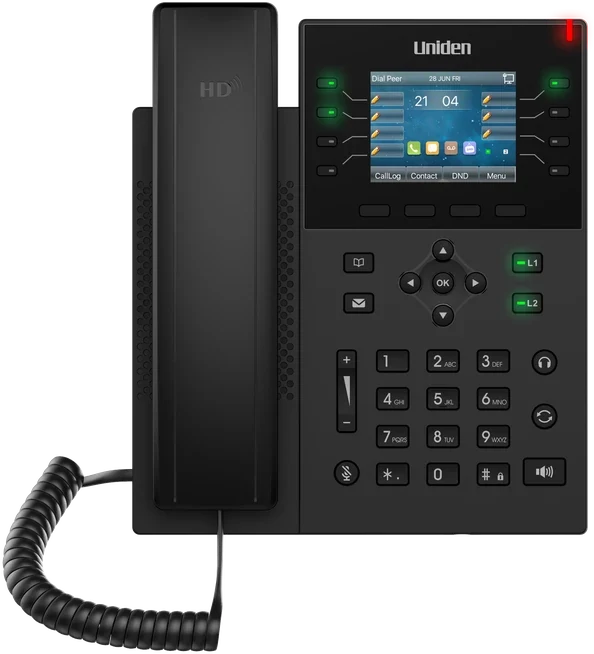
If you do want desk phones, good IP handsets typically cost around $100 to $400 each. As an example, the Uniden EVOC2 HD Bluetooth desk handset is a one-off $249 and plugs straight in. Uniden also offers conference phones and headsets, and a phone in a box setup for businesses that want handsets arriving ready to go. For a five-person office that wants a handset on every desk, five EVOC2s come to $1,245 once, which is a long way from the thousands an on-premise PBX asks for before it makes a single call.
Before you buy anything, ask whether your current handsets can be reused, and work out who genuinely needs a desk phone. Staff who live on the road are often better served by the mobile app alone.
Reading a Quote Line by Line
Once two or three quotes are on the table, the job is to make them truly comparable. Pricing pages are designed to look alike; the differences are in the fine print. This is the routine we would suggest.
- Get the questions answered in writing. Is there a seat minimum? What is the one-off setup fee? Are AI, recording and integrations included or extra, and is AI billed per minute? Is porting free, and will there be downtime? How long is the contract and what does it cost to leave early?
- Build a true monthly figure. Multiply the per-user price by your headcount, add every extra you will really use (AI, recording, integrations, reporting, SMS), then spread one-off fees such as setup and porting across twelve months and add those too.
- Stretch it over the term. Multiply that monthly figure by the contract length and write the exit penalty beside it. A slightly lower rate locked in for three years with heavy exit fees is often worse value than a slightly higher rate you can walk away from.
- Match the features. Write down the features you need and tick each quote against the list. If one quote includes AI and the other charges for it, they are different products, whatever the headline says.
- Put a value on support. Where the support team sits, whether you get an account manager or a ticket number, Australian hosting and call quality never appear as line items, but they cost real money when they go wrong. Cheap service with offshore support that takes days to reply can lose you more in missed calls than it saves.
- Compare against your baseline. Finally, set each three-year total against what your current setup costs over the same period. That tells you whether switching saves money, and roughly how much.
"Knowing that our phones are always connecting our customers with the right staff has simplified our customer engagement. Having features like this, which are usually only available to larger companies, in a cost-effective manner is excellent." Marie-Claire, Owner, Wealth of Health
What You Pay With Uniden Voice Over Cloud
Uniden has been an Australian household name since 1966, and Uniden Voice Over Cloud brings that name to the business phone. The pricing follows the same idea as the rest of this guide: one clear number, with the useful features already inside it.
One Per-User Price
A single monthly price per user that includes the full feature set. No ladder of tiers and no stripped-down starter plan built to push you up a level.
AI Call Agents Included
AI call agents trained on your business information and speaking in natural Australian voices come with the platform, not as a per-minute or per-seat extra.
Pay for the Seats You Use
One user or a hundred. There is no three-user minimum padding the bill before your first call.
Uniden Hardware if You Want It
The EVOC2 HD desk handset, conference phones and headsets, or a phone in a box setup. Optional, never compulsory.
Free Demo and Installation
No setup or onboarding fee, a dedicated account manager who handles most of the configuration, and free number porting for a limited time with no downtime.
Hosted and Supported Here
100% Australian-hosted, with 24-hour local support. No overseas call centre and no customer data sent offshore.
In practice, that means the quote you receive is close to the bill you pay. There is no charge for AI on top, no seat minimum, no setup fee, and no offshore support queue. You get 50+ features, AI call agents, and native integrations with Xero, MYOB, Salesforce, HubSpot, Zoho, Google My Business and Slack under one per-user price. If your internet needs sorting at the same time, Uniden also offers business nbn bundles, so phones and connection can sit on one account.
"Uniden Voice Over Cloud perfectly complements our billing software. The ease of integration with our billing software and great local support improved our own customer interactions and now many of our customers have made the switch." Chris, Operations Manager, PracBill
Common Pricing Questions
Further Reading on Choosing a Phone System
Once you have a budget, the next questions are which system, which type of connection, and how much AI is worth to you. These articles pick up from here.