






















The Cost of Typing While You Listen
People are not good at two language tasks at once. Listening to someone explain a problem and composing written words about it both draw on the same attention, so when you do both you do each one worse. Anyone who has taken a call while typing knows the symptoms: asking the caller to repeat something they said thirty seconds ago, missing the one sentence where they explained what was really bothering them, and ending up with a note that records the facts and misses the point.
Callers notice it too. They hear the keyboard, the pauses, the "sorry, can you spell that again". They hear that they are talking to someone who is filling in a form rather than someone who is dealing with them. It is a small thing on any one call and it adds up to how your business sounds.
| What typing during a call does | What it costs |
|---|---|
| Splits attention | The person answering hears the facts and misses the tone, the hesitation and the real reason for the call. |
| Slows the conversation | Every "hang on, let me get that down" adds seconds, and callers fill the silence by repeating themselves. |
| Produces partial notes | People write what they had time to write. The note captures the address and misses the promise to ring back by Thursday. |
| Pushes work after the call | Whatever did not get typed during the call gets typed afterwards, while the next caller waits. |
| Relies on memory | Notes finished after the call are reconstructed, and reconstruction is where "I am sure they said Tuesday" comes from. |
The usual fix is to tell staff to note less, or to write it up later. Both make the record worse. The better fix is to take the typing out of the call entirely and let the phone system produce the record, so the person on the line can do the one thing only a person can do, which is actually talk to the customer.
Wrap-Up Time Is Where Your Queue Comes From
Here is the part most businesses have never measured. Every call has two pieces of time attached to it: the talk time, and the time after the call where the person finishes notes, updates a system and gets ready for the next one. Contact centres call the second piece after-call work or wrap-up. During wrap-up that person is not available to answer the phone, so from the queue's point of view the call is still going.
Wrap-up looks small because it is only a minute or two. Queues do not behave in a straight line, though. As a team gets busier, waiting times climb slowly at first and then very steeply, so shaving a small amount off every call can make a very large difference to how long people wait.
To show the scale, here is a worked example using the Erlang C model, which is the standard way contact centres estimate queue behaviour. The numbers are illustrative, not measurements from any particular business.
| Scenario: six people, fifty calls in the busiest hour, four minutes of talk per call | Wrap-up of 2.5 minutes (typing notes) | Wrap-up of 30 seconds (checking an AI note) |
|---|---|---|
| Time each call occupies a person | 6.5 minutes | 4.5 minutes |
| How busy the team is | About 90% | About 62% |
| Share of callers who wait at all | About 75% | About 23% |
| Average wait, across all callers | About 8 minutes | About 27 seconds |
| Callers answered within 20 seconds | About 28% | About 81% |
Nobody on that team is working any harder in the second column, and nobody got faster at talking. Two minutes of typing came off each call and the queue nearly disappeared. In real life, callers who wait eight minutes do not all wait. Many hang up, and some of them ring your competitor, so the first column is also a revenue problem.
Less waiting and less customer frustration are not separate goals from better notes. They are the same goal. The time your team spends finishing notes after a call is time the next caller spends on hold. Take the typing out and you give that time back to the queue. We put a short video together showing this idea in action: Less Waiting. Less Customer Frustration.
If you want to see what your own queue looks like, our guide to call flow design covers routing, and our comparison of UCaaS and CCaaS explains when a business has a real queue problem that needs queue software.
What the AI Is Doing While You Talk
You do not need to understand the technology to use it well, but a rough picture helps you know what to expect. While the call is live, the phone system turns speech into text. When the call ends, a language model reads that transcript and produces a summary, a list of action items and whatever structured fields you have set up, such as a job type or a callback date. That note is then attached to the call record and, if you have connected it, written to your CRM or job system.
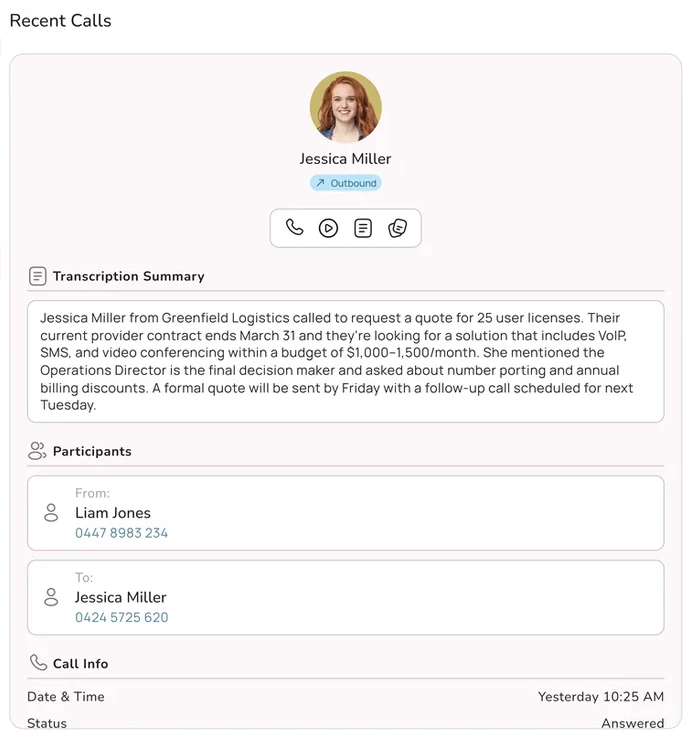
The important point is where this happens. When transcription runs inside the phone system, every call that passes through it can be captured without anybody pressing a button. When it depends on an app or a bot that someone has to start, some calls get captured and some do not, and you will not know which. We went through that difference, and how the note gets into your CRM, in AI call transcription, summaries and CRM notes. This article picks up where that one stops: the people side, and the habits that decide whether the notes are any good.
AI notes are a draft, not a record, until someone approves them
A summary is the model's best reading of the transcript. It is usually right, it is sometimes confidently wrong, and it cannot know what was agreed if nobody said it out loud. Treat every AI note as a draft that becomes the record once the person who took the call has checked it. That one rule prevents almost every problem in the rest of this article.
Before the Call
Most of the work that makes AI notes good happens before anybody picks up the phone, and it only needs doing once.
Set the recording notice at the platform. The caller should hear that the call may be recorded before the conversation starts. Put it in the greeting or the queue message so it happens on every call, rather than relying on staff to say it. Outbound calls need the same treatment, usually a short line from the person making the call.
Choose one summary template per team. A plumber's office and a physio clinic need different notes. Decide what a good note looks like for your business (there are examples further down), set it as the template, and every summary comes out in the same shape. Consistency matters more than perfection here, because consistent notes are easy to scan and easy to check.
Teach it your words. Product names, suburb names, staff names and industry terms are where transcription trips most often. Most platforms let you add a vocabulary list. Ten minutes on this saves a lot of corrected spellings later.
Connect the destination. Decide where the approved note goes: the CRM contact, the job, the patient file, the ticket. A note that lives only in the phone system is useful. A note that lands on the right record automatically is what actually saves the time.
Tell your team what changes. People need to know they are allowed to stop typing. Without that permission most will keep doing both out of habit, and you get none of the benefit.
During the Call: Talk for the Transcript
This is the habit change, and it is small. The AI can only summarise what was said. If a detail lives only in your head, or only on a screen you glanced at, it will not be in the note. So the skill is to say the important things out loud, in a way that also happens to be good customer service.
| Habit | What it sounds like | Why it helps the note |
|---|---|---|
| Read numbers back | "So that is 0412 555 019, and the invoice number is 20418." | Numbers are the most common transcription error. Hearing them twice gives the model a second chance and the caller a chance to correct you. |
| Spell names and streets | "Is that Nguyen, N G U Y E N?" | Names are the second most common error, and Australian surnames and suburbs vary enormously. |
| Say the commitment in full | "I will ring you back before 3pm Thursday with the quote." | The model can only record a promise that was spoken. "Leave it with me" produces no action item. |
| Name who is doing what | "You will send the photos tonight, and I will book Dave for Monday." | Stops the summary assigning the caller's task to you, or yours to them. |
| Summarise at the end | "Just to check I have this right..." | The closing recap gives the model a clean statement to anchor the summary on, and customers like it. |
| Say what you looked up | "I can see your last service was in March." | If you read something from a screen silently, it is not in the transcript and cannot be in the note. |
Notice that none of these make the call longer in any meaningful way. Reading back a number takes three seconds and it is something good receptionists already do. The difference is that now it serves two purposes. The last habit in the table is the one people forget most: anything you check on screen during the call and do not say out loud, the AI cannot see.
There is one thing to avoid. Do not narrate for the machine in a way that sounds odd to the customer, such as "note: customer is annoyed". Speak to the caller. If something matters that you would not say to them, add it yourself during the review.
After the Call: The Twenty Second Review
The goal is to replace two or three minutes of writing with twenty or thirty seconds of checking. That only works if people check the right things in the same order every time. Here is the routine.
| Step | Check | Seconds |
|---|---|---|
| 1. Who | Is the note on the right customer or record, and is the name spelled correctly? | 3 |
| 2. Numbers | Phone numbers, invoice numbers, amounts, dates and times. Compare against what you remember and what you read back. | 5 |
| 3. Promises | Is every commitment you made listed, with the right date? Is anything listed that you did not promise? | 5 |
| 4. Who does what | Are tasks assigned to the right person, you or them? | 3 |
| 5. Anything missing | Is there something you know that was not said, such as a concern you picked up or a history you looked up? Add one line. | 4 |
| 6. Approve | Save it to the record. | 1 |
Two rules make this stick. First, fix, do not rewrite. If the summary is ninety per cent right, correct the ten per cent and move on. Rewriting from scratch brings back the wrap-up time you were trying to remove. Second, check while the call is fresh. A summary reviewed an hour later is being checked from memory, which is exactly the problem you started with.
Managers should spot check a handful of approved notes each week against the transcript. The point is not to catch people out. It is to find out which errors your setup makes most often, so you can fix the vocabulary list or the template rather than asking everybody to be more careful.
Where AI Notes Go Wrong
AI summaries are generally good, and their mistakes are predictable. Knowing the pattern is what makes a twenty second check possible.
| Error | Example | How to prevent or catch it |
|---|---|---|
| Wrong numbers | "Fifteen" heard as "fifty", a digit dropped from a phone number, $1,850 recorded as $1,815. | Read numbers back during the call. Always check numbers in the review. |
| Misspelled names | Siobhan written as Shivon, Toowoomba written as Two Womba. | Spell during the call. Add common names and places to the vocabulary list. |
| Invented action items | "Send the customer a brochure" when nobody mentioned a brochure, because it is the kind of thing that usually happens. | Delete anything you did not agree to. This is the error most worth watching for. |
| Softened or hardened commitments | "I will try to get someone out Friday" becomes "technician booked for Friday". | Say commitments precisely. Check promises word by word. |
| Mixed up speakers | The caller said they would send photos, the note says you will. | Name who is doing what during the call. |
| Missing context | The note records the request and misses that this is the third call about the same leak. | Say the history out loud, or add one line in the review. |
| Relative dates | "Next Tuesday" recorded without a date, which means something different by the time anyone reads it. | Say the actual date. Set the template to convert relative dates. |
Watch for invented tasks most of all
A wrong phone number is annoying. An action item nobody agreed to is dangerous, because the next person may act on it, or the customer may later be told something was promised that was not. Language models tend to fill a summary with what would normally happen next. The review step exists mainly to remove those.
Summary Templates by Business Type
A template tells the AI which facts matter to your business and in what order. Keep it short. A note nobody can read in ten seconds is not a better note, it is a longer one. Here are starting points you can adjust.
Trades and field service
Customer and site address. Problem in one line. Urgency (emergency, this week, quote only). Access notes (dog, gate code, tenant contact). Photos requested. Booking made or quote to follow, with date. Who is attending.
Clinics and allied health
Patient name and date of birth confirmed. Reason for call (booking, reschedule, results, script, billing). Appointment details. Practitioner. Callback needed and by whom. Keep clinical detail out of the phone summary unless your practice policy says otherwise.
Sales
Company and contact. What they need and why now. Budget or quantity if stated. Decision maker and timing. Competitors mentioned. Objections. Agreed next step with date. Stage change for the CRM.
Customer support
Account or order number. Issue in one line. Steps already tried. Outcome (resolved, escalated, waiting on customer). Ticket reference. Promised follow-up with date. Customer sentiment in one word if it matters.
Real estate and property
Property address. Caller role (tenant, owner, buyer, tradesperson). Request (repair, inspection, offer, enquiry). Urgency, with urgent repairs flagged clearly. Agreed action and date. Anyone who needs to be told.
Professional services
Client and matter. Question asked. Advice given or deferred (be careful here). Documents requested. Deadlines mentioned. Time spent, if you bill by the call. Follow-up owner.
Two tips. Put the thing people search for first, usually the customer and the one line problem, so the record list is scannable. And keep a field for "promised", separate from general action items, because promises are what customers remember and what causes complaints when they are missed. Industry specific guides for tradies, medical and allied health practices and real estate agencies cover the rest of the phone setup for each.
If you work under formal record keeping rules, such as NDIS providers, AI notes can help you meet them, but the rules about contemporaneous notes and retention still apply to you, not the software. Our NDIS record keeping guide goes through what that means for phone calls.
Handovers and Callbacks
Good notes matter most when someone else picks up the thread. The customer who rings back on Friday does not want to explain everything again to a different person, and the staff member who answers does not want to guess.
Make the note visible on the next call. When a known number rings, the person answering should see the last summary before they say hello. That turns "can you tell me what this is about?" into "Hi Sarah, is this about the hot water system?", which is the single biggest improvement customers notice.
Turn promises into tasks automatically. An approved "I will call back before 3pm Thursday" should create a task with that deadline, assigned to the right person. If callbacks live only in someone's memory, the AI has improved the note and changed nothing about the outcome.
Handover between shifts and to after hours. A short list of today's open promises, generated from approved notes, is a much better handover than a conversation at the door. If you run an after hours service or an AI agent overnight, the morning team should start with a list of what came in and what was promised, not a pile of voicemails.
Keep the transcript one click away. The summary is for speed. When there is a dispute, a complaint or a detail the summary did not capture, the transcript is what settles it. Staff should know where to find it and managers should know who can access it.
This is also where AI notes start feeding other things. Once every call produces a structured, approved record, you can review calls for quality, coach new staff and spot patterns. Our guide to AI call scoring and quality assurance is the natural next step.
The Shadow Notetaker Problem
While businesses decide what to do about AI notes, many of their staff have already decided for themselves. Free meeting assistants join video calls from a calendar invite. Phone apps record and transcribe calls on a personal mobile. Small wearable recorders clip onto a lanyard and summarise every conversation of the day. They are cheap, they genuinely help, and in a business setting they create problems nobody signed off on.
The legal risk is no longer hypothetical. In August 2025, a class action was filed in the United States against Otter.ai, a popular meeting transcription service, in a case known as Brewer v. Otter.ai. It was later consolidated with several similar suits. The plaintiffs allege that Otter's meeting assistant joined and recorded conversations without the consent of all participants, and that recordings were used to train the company's models. The claims are brought under US federal and state wiretapping and privacy laws and an Illinois biometric privacy law. These are allegations, and the company is defending the case. The reason it matters to an Australian business is not the US law. It is the pattern: a tool installed by one participant, recording everybody else, with the data going somewhere the business did not choose.
| What goes wrong with unapproved notetakers | Why it matters |
|---|---|
| No notice to the other party | Your caller was never told. Recording notification is the baseline of Australian practice, and a personal app skips it. |
| Data leaves the business | Transcripts sit in a personal account, often overseas, under terms the business never read. |
| Possible model training | Some free services reserve rights to use content to improve their products. Your customers' details may become someone else's training data. |
| No access control or deletion | When the staff member leaves, the recordings leave with them. |
| Patchy coverage | Some calls are captured, some are not, and the business has no reliable record either way. |
| Privacy obligations still land on you | If personal information about your customers is collected through your staff, it is your business that has to answer for how it is handled. |
The fix is not a ban on its own, because people will keep using tools that save them time. The fix is to give them something better that the business controls: notes produced by the phone system, with notice, storage, access and deletion handled centrally. Then write a one paragraph policy that says personal recording apps, meeting bots and wearables are not to be used on business calls, and explain why. Our guides on how AI improves business phone security and AI voice cloning and vishing cover the wider security picture, including why a pile of stray call recordings is useful to the wrong people.
Consent and Privacy in Australia
AI note taking involves recording or transcribing the call, so the normal Australian rules for call recording apply. This is general information, not legal advice, and you should check your own obligations, particularly if you operate in more than one state or in a regulated industry.
Recording law. Call recording is governed by a mix of federal law, including the Telecommunications (Interception and Access) Act, and separate surveillance and listening devices laws in each state and territory. The rules differ between jurisdictions, so the safe and widely used practice is to tell everyone on the call that it may be recorded, explain why, and give them a way to object. A transcript is a record of the call for this purpose, so the same notice covers it. Our call recording guide goes through the setup.
The Privacy Act. Transcripts and summaries contain personal information, so the Australian Privacy Principles apply to how you collect, use, store, secure and eventually delete them. In practice that means being open about recording in your privacy policy, limiting who can see transcripts, keeping them only as long as you need them, and being able to respond if a customer asks what you hold about them.
Automated decisions. From 10 December 2026, privacy policies must explain when personal information is used in decisions made substantially by computer that significantly affect people. A summary that a person checks and approves is unlikely to be that kind of decision on its own, but if you start using AI notes to drive automatic outcomes, such as prioritising or declining customers, read our automated decisions guide.
Where the data lives. Many AI note services process and store audio overseas. For health information, financial conversations or anything sensitive, keeping recordings and transcripts in Australia makes the privacy conversation much simpler and is increasingly what customers and auditors expect.
A simple rule set that covers most businesses
Notify every caller at the start of every call. Record and transcribe only on the business phone system. Keep transcripts in Australia. Limit access by role. Set a retention period and let the system delete on schedule. Mention call recording and transcription in your privacy policy. Ban personal recording apps and meeting bots on business calls.
A Two Week Rollout
AI notes are one of the easier AI changes to make, because the people using them see the benefit on day one. Even so, a short structured start avoids the two common failures: staff who keep typing out of habit, and summaries nobody checks.
| When | What to do |
|---|---|
| Days 1 to 2 | Confirm the recording notice plays on inbound and outbound calls. Set up one summary template. Add your vocabulary list. Update the privacy policy wording. |
| Days 3 to 5 | Switch it on for two or three people who take a lot of calls. Ask them to stop typing and use the twenty second review. Note which errors come up. |
| Week 2, start | Fix the template and vocabulary based on what the pilot found. Connect approved notes to your CRM or job system. |
| Week 2, middle | Roll out to everyone who answers calls. Run a fifteen minute session on the talk-for-the-transcript habits. Publish the no personal recording apps policy. |
| Week 2, end | Compare wrap-up time and answer times with the week before. Spot check ten approved notes against transcripts. |
How to Tell It Is Working
Pick a few numbers you can see in your phone system reports and check them before and after.
Wrap-up
Average time between the end of one call and availability for the next. This should fall first and furthest.
Answer time
How long callers wait in your busiest hour. Small wrap-up savings show up here as large improvements.
Abandoned
Callers who hang up before being answered. Fewer waiting callers means fewer lost ones.
Add two quality checks alongside the speed numbers. How often a reviewer had to correct a summary, which should fall as your template and vocabulary improve. And how many callbacks were missed, which should fall once promises become tasks automatically. If speed improves and quality does not, people are approving summaries without reading them, and the fix is a conversation, not more software.
How Uniden Voice Handles Call Notes
Uniden Voice over Cloud transcribes and summarises calls inside the phone system, so every call that goes through your business numbers can be covered, whether it is answered on a desk phone, the mobile app or the desktop app. There is no bot to invite and no personal app to install. Summaries use templates you set, the recording notice is configured once at the platform, and approved notes can be written to your CRM so the next person who takes a call from that customer can see the history before they answer.
AI features are included in the platform rather than sold as a per-user add-on, and recordings and transcripts are hosted in Australia with access controlled by role. When you need help setting templates, connecting your CRM or checking your recording notices, you talk to an Australian support team who can see your setup.
If you are still running an older phone system where none of this is possible, our page on when it is time to upgrade your business phone system sets out what changes. And if you want to see the queue effect for yourself, the short video Less Waiting. Less Customer Frustration. shows the idea in under a minute.