


















Before You Change Anything: Three Questions
Most phone faults get harder to fix because someone starts changing settings before they know what is actually wrong. A receptionist reports "the phones are bad", a staff member reboots the router, somebody else swaps a cable, and by lunchtime nobody can say which change helped or hurt. Spend five minutes on three questions first. The answers point you at the right layer and save hours.
1. Who is affected?
One handset, one desk, one floor or the whole business? A single bad phone points at that device, its cable or its port on the switch. Every phone at once points at the router, the internet line or the platform. Only staff on Wi-Fi points at the wireless network. Only people working from home points at their own connections, not the office.
2. When does it happen?
Constant faults are usually configuration. Faults that come and go are usually load. If the audio breaks up every afternoon around the same time, look for something scheduled: a cloud backup, a large sync, a staff member uploading video. If calls always drop at the same number of seconds, that is a timer somewhere, and timers almost always live in the router.
3. What exactly do people hear?
"Bad quality" is not a symptom. Ask for detail. Robotic or underwater audio, silence in one direction, a call that rings but cannot be answered, an echo of your own voice, a half-second pause before the other person replies: each one belongs to a different layer, and the symptom finder further down maps them out.
How a Call Actually Travels
The call setup (SIP): Session Initiation Protocol is the conversation between your phone and the platform that says "ring this number", "they answered", "hang up". When SIP fails, the handset will not register or the call never connects.
The voice itself (RTP): once the call is up, your voice travels as a steady stream of small Real-time Transport Protocol packets, often on different ports and sometimes by a different route from the SIP messages. When SIP works but RTP does not, the call connects and then one or both people hear nothing.
Keep that split in mind for the rest of this guide. A call that connects but stays silent is not a "phone system down" problem. The setup worked; the audio got lost on the way. That one fact narrows the search a long way.
~100 kbps
rough upload needed for each call happening at the same time
<150 ms
one-way delay ceiling before conversation starts to feel awkward
<1%
packet loss you can tolerate before words start dropping out
Step one
turn off SIP ALG on the router before you try anything else
The Five Places a Call Can Fail
Picture a call leaving one of your desks. It starts in the handset or headset, runs down a cable or over Wi-Fi to a switch, passes through the router, travels out over your nbn or fibre line, crosses the carrier networks and lands on the phone platform, which connects it to the person you are calling. Something can go wrong at every hop, but each hop fails in a recognisable way.
- Handset and headset. Echo, low volume, crackle on one device only, a phone stuck on "registering" after a factory reset. Usually a firmware, volume or settings issue on that unit.
- Office network. Problems only on Wi-Fi, only on one floor, or only when a particular person is on a video meeting. Cabling, access points and switches live here.
- Router. One-way audio, calls cutting out on a fixed timer, phones going unregistered, inbound calls not ringing. NAT, SIP ALG and firewall rules live here.
- Internet line. Choppy, robotic or clipped audio, worse at busy times. Upload capacity, contention and line faults live here.
- Platform. Delay from an offshore media path, codec clashes with certain callers, SIP trunk and DNS faults, outages with no failover. On a self-run PBX this layer is yours; on a managed service it belongs to the provider.
Working from the desk outward has a practical advantage: the near layers are cheap and quick to test. Swapping a handset or plugging a laptop into a cable takes a minute. Ringing your carrier about a line fault can take a day. Rule out the easy things first.
Symptom Finder: What You Hear and Where to Look
Find the closest match to what your staff are reporting. The second column tells you which layer to look at, the third gives the quickest test, and the last column is what usually resolves it. The highlighted rows are the ones a support desk sees most.
| What people report | Layer to check | Quick test | Usual resolution |
|---|---|---|---|
| "I can hear them, they can't hear me" (or the reverse) | Router | Does it happen on every phone, every call? | Turn off SIP ALG; allow the RTP port range through the firewall |
| Voice sounds robotic, broken or underwater | Internet line, then Wi-Fi | Does it get worse when someone uploads a big file? | Set up QoS; move the phone onto a cable; reschedule backups |
| Calls cut out at about the same point every time | Router | Time three dropped calls; are they within a few seconds of each other? | Turn off SIP ALG; increase the router's UDP session timeout |
| Handset says "unregistered" or incoming calls stop | Router, then handset settings | Does a reboot fix it for a while, then it drifts back? | Enable keep-alives; check timers, DNS and login details; SIP ALG off |
| Long pause before replies, people talk over each other | Distance (platform) | Ask your provider where the audio is hosted | Keep media in Australia; cut out Wi-Fi hops; QoS on a busy link |
| Callers hear their own voice coming back | Handset or headset at the far end | Does it stop when the other person drops their volume? | Lower speaker volume; use a proper headset; update firmware |
| Fine at the desk, poor when walking about | Office Wi-Fi | Same call on a cable or on 4G/5G? | 5 GHz band, Wi-Fi QoS (WMM), better access point coverage |
| Silence only with one supplier or one site | Platform (codecs) | Is there a pattern in who is on the other end? | Make sure a shared codec is offered; let the platform negotiate |
| Can ring out, but inbound calls go nowhere | Router or platform routing | Ring your main number from a mobile and watch the handset | Check inbound number routing and the direction of firewall rules |
If You Only Do One Thing Today
Log into the router, find the SIP ALG setting (it may be under NAT, WAN, firewall or "advanced"), switch it off, then restart the router and every handset. It costs nothing, takes ten minutes, and clears up an unreasonable number of faults on its own. If the problem survives that, you have ruled out the single most common cause and can move on with confidence.
The Router: SIP ALG, NAT and Firewalls
If calls connect but the audio misbehaves, or phones keep losing their connection to the platform, the router is the first place to look. Three features cause nearly all of the trouble here, and they tend to interact.
NAT and the "lost return address" problem
Your office has one public internet address and dozens of private ones inside, usually starting with 192.168. Network Address Translation (NAT) is how the router shares that single public address among every device. The catch for voice is that SIP messages can carry the handset's private address inside them. The platform then tries to send audio back to an address that does not exist on the internet, and the voice stream heading towards you goes nowhere. You hear silence; the caller can still hear you. That is one-way audio in a sentence.
SIP ALG: a helper that usually gets in the way
Router makers know about the NAT problem, so many of them switch on a feature called SIP ALG (Application Layer Gateway) by default. Its job is to read SIP messages as they pass and rewrite the addresses so the audio can find its way back. On paper, a good idea. On most consumer and small-office routers, the rewriting is done badly. It corrupts the messages it is meant to fix, which leads to one-way audio, calls that hang up after a set time, handsets that will not register and calls that ring but go dead when answered. Current VoIP platforms deal with NAT properly at their end and do not need the router to help. Turning SIP ALG off is the right call on almost every network.
Firewalls that let the call in but keep the voice out
A firewall rule set that allows SIP but blocks the audio ports gives you calls that connect and stay silent. RTP uses a wide range of UDP ports (often somewhere around 10000 to 20000, though every provider publishes its own range). If your firewall is locked down, that range needs to be allowed outbound with return traffic permitted. Get the list from your provider rather than guessing.
Double NAT
A surprising number of small offices have two routers in a row: the one the nbn installer left and a second one somebody added for better Wi-Fi. Both do NAT, so voice traffic is translated twice and the odds of a broken return path go up. Put one of them into bridge or modem-only mode so a single device is doing the job.
Router Fixes, in the Order to Try Them
First: SIP ALG off, router restarted, handsets restarted. Test again before changing anything else.
Second: confirm your provider's SIP port and RTP port range are allowed outbound, with replies allowed back in.
Third: look for double NAT and remove it by bridging one device.
Fourth: raise the router's UDP session timeout and make sure handsets send keep-alives or use the NAT settings your provider recommends.
Why the fourth step matters: timers
Routers forget idle connections. When a handset registers with the platform, the router opens a short-lived path (a "pinhole") so the platform can reach the phone with incoming calls. If the router closes that path before the handset checks in again, the platform loses track of the phone and inbound calls fail without anyone noticing. The same timer can cut an active call if the mid-call refresh message is blocked or mangled. Calls dying at 30-odd seconds every time, or phones that work after a reboot and then quietly go deaf, are both signs of a timer mismatch. The cure is a longer UDP timeout on the router, a registration interval comfortably shorter than that timeout, and keep-alive packets turned on in the handset.
Handset Won't Register? Check These
Login details: SIP username, password, domain and port entered exactly as supplied, with no stray spaces.
Router: SIP ALG off and the SIP port allowed outbound.
Timers: registration interval shorter than the router's UDP timeout, keep-alives on.
Name lookup: the platform's hostname, and any SRV records, resolve quickly from inside your network.
The Internet Line: Busy, Not Slow
The most common complaint any phone provider hears is "the calls sound terrible", and the most common assumption is that the internet is too slow. It almost never is. A voice call is tiny: somewhere around 85 to 100 kbps in each direction with a typical codec. Even a modest business nbn service can carry many of them at once. What breaks voice is not a small pipe but a crowded one.
What jitter and packet loss sound like
Your handset sends voice in small packets at a steady beat. If they arrive unevenly, that unevenness is called jitter. The receiving phone holds a few milliseconds of audio in a jitter buffer to smooth out the bumps, but when the variation is bigger than the buffer you hear it as a robotic, stuttering voice. If packets do not arrive at all, that is packet loss, and the words they carried are simply gone. One or two per cent loss is already noticeable on a call, though you would never see it on a web page.
Contention: the real reason calls break up
Think about what else is using your line at 3 pm: the overnight backup that actually runs during the day, a designer sending large files to a client, someone streaming a training video, an operating system update on twenty laptops. Without any rules, the router treats a voice packet the same as a chunk of backup data, so voice ends up queued behind it. It arrives late or not at all. A speed test at 9 am will look fine; the calls at 3 pm will still sound awful. Oversized queues on a saturated link (often called bufferbloat) add delay on top.
QoS: telling the router what matters
Quality of Service is simply a rule that says "voice goes first". On a business router you will usually find it as a QoS, traffic priority or DSCP setting, and many routers have a ready-made voice or EF (expedited forwarding) class. Prioritise your handsets or your provider's voice traffic, and bulk transfers will wait a few milliseconds while calls go straight through. For most offices this matters more than upgrading the plan.
Clearing Up Broken or Robotic Audio
Plug in: desk handsets and computers on cables, not Wi-Fi, wherever possible.
Prioritise: switch on QoS so voice is never stuck behind downloads or backups.
Leave room: about 100 kbps of upload for every call you expect at once, plus spare.
Smooth it: set the jitter buffer to adaptive, or raise it a little, on the handset or app.
Move the heavy lifting: run backups and big syncs after hours and cap bulk uploads.
If QoS is set, phones are cabled and the audio still breaks up at quiet times, the loss may be on the line itself rather than in your office. That is the point to talk to your connection provider about a line fault. Pairing your phones with a Uniden business nbn plan means the same team looks after both the line and the calls, so you are not stuck between two companies each blaming the other.
Inside the Office: Handsets, Headsets and Wi-Fi
The nearest layer is also the easiest one to check, and it is where a lot of "the system is broken" reports turn out to be one device on one desk.
Echo is usually someone's speaker
When you hear your own words come back a moment later, the fault is almost always at the other end. Their microphone is picking up their loudspeaker and sending your voice back to you. Loud speakerphones, cheap handsets and headsets with echo cancellation turned off are the usual causes. Delay makes it worse, because a reflection that arrives late is far more distracting than one that arrives almost instantly, which is why offshore calls seem to have more echo. To fix it:
- Ask the person whose voice is not echoing to turn their speaker down; the echo you hear starts at their end.
- Use a decent headset with echo cancellation built in instead of an open speakerphone.
- Keep handset and adapter firmware current, because echo handling improves between releases.
- Reduce delay with a wired connection and local hosting, so whatever echo is left is barely noticeable.
Good hardware removes a whole class of complaints
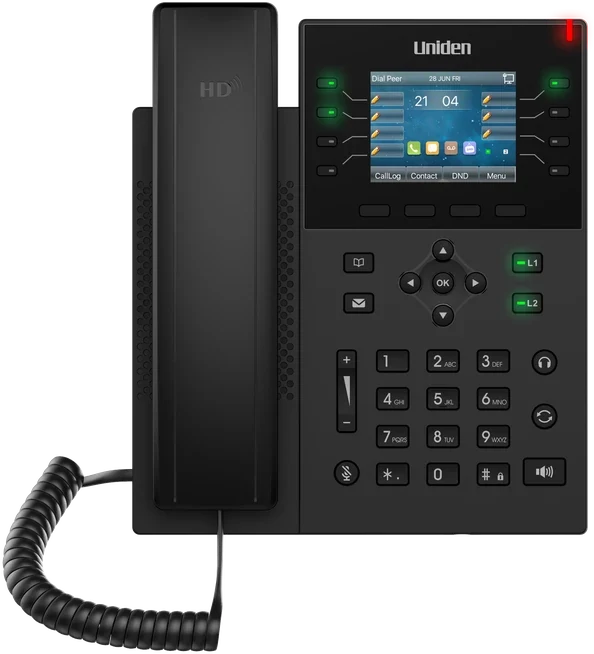
A purpose-built business handset does a lot of quiet work: proper echo cancellation, a well-tuned jitter buffer, sensible keep-alive defaults and firmware that is maintained. The Uniden EVOC2 HD desk handset is built for exactly this job and comes set up for the platform, with conference phones and headsets available alongside it. Uniden has been making phones for Australian homes and offices since 1966, and a handset that arrives pre-configured means nobody in your office is typing SIP settings into a keypad.
Wi-Fi: fine for browsing, fussy for voice
A wireless network can pass a speed test with flying colours and still make calls sound rough, because voice cares about consistency and Wi-Fi is inherently variable. Common causes:
- A crowded 2.4 GHz band: neighbouring networks, Bluetooth and even the staff microwave add interference.
- The edge of coverage: retries pile up at the fringe and audio starts breaking.
- Walking between access points: the device hands over mid-call and drops a second of audio.
- Too many devices on one access point: they all queue for airtime.
Making Wi-Fi Calls Bearable
At a desk: use a cable. It sidesteps every wireless problem at once.
Band: put voice devices on 5 GHz, which is cleaner and less crowded.
Priority: turn on WMM (Wi-Fi QoS) so access points send voice frames first.
Coverage: add access points for big floors rather than stretching one.
Out and about: a strong 4G or 5G signal on the mobile app often beats weak, busy Wi-Fi.
To be straight about it: VoIP needs a stable connection underneath it. A good app copes well with changing networks, but no platform can make a weak signal sound like a clean cable. That is a property of internet calling in general, and it is one of the honest trade-offs covered in our VoIP vs landline comparison.
Distance: Delay and Where Your Audio Travels
Some delay is unavoidable, but below about 150 milliseconds one way, nobody notices. Go past it and conversations start to feel like a satellite link: awkward pauses, both people starting to speak at once, then both stopping. Local fixes help at the margins. Too much buffering and bufferbloat both add delay, and QoS reduces both. The big, avoidable cause, though, is geography.
If your provider handles audio in Singapore, the United States or Europe, a call from Parramatta to Penrith can travel under an ocean and back before it reaches the other desk. Every packet makes that trip. No router setting can shorten it. This is why hosting location is one of the first questions to ask any provider, and why cloud phone systems hosted in Australia tend to sound more natural to Australian callers: the audio never leaves the country.
Uniden Voice over Cloud is 100% Australian-hosted. The media path stays onshore, which keeps delay down and keeps your call data in Australia as well.
Running Your Own PBX or SIP Trunk
If your business runs its own phone system, either an on-premise PBX or a self-managed PBX connected to a SIP trunk, there is another layer of settings to check. These are the faults that take the longest to find, because they hide behind configuration screens most staff never open.
Ports
SIP normally uses port 5060 over UDP or TCP, or 5061 when encrypted with TLS. Audio uses the provider's RTP range. Opening one and not the other is a classic mistake: calls connect and then sit in silence. Use the exact list your trunk provider publishes.
Codecs
A codec is the method used to squeeze voice into packets and unpack it at the other end, and both ends need one in common. G.711 sounds excellent and uses more bandwidth. G.729 uses less at a small cost in quality. Opus is newer and copes well with changing network conditions. If a device has been locked to a single codec that the other side does not offer, calls to certain parties fail or go silent. Enable a sensible list and let the system negotiate, rather than forcing one.
DNS and SRV records
Phones and PBXs usually find the SIP server by name, and SRV records tell them which port and which server to try first. Slow or wrong DNS, or a broken SRV record, makes trunks register intermittently and calls route unpredictably, which is maddening to chase down. Use reliable DNS servers, check your provider's records resolve from inside your network, and use the hostnames they give you rather than hard-coding IP addresses that may change.
Every Setting Is Something to Maintain
Ports, codecs, DNS, SRV records, registration timers, trunk passwords, firmware and server patches: each one is a point of failure on a self-run system, and each one is your job to set up, watch and repair. Every router swap, new site or extra batch of handsets means going over it again. Our hosted vs on-premise PBX comparison lays out that workload side by side.
Three Real-World Fault Patterns, Worked Through
These are composite examples of the patterns support teams see over and over. The details are illustrative, but if one of them sounds like your office, the fix probably will too.
Pattern 1: "Calls keep hanging up on us"
A small accounting practice replaces its router over a weekend. On Monday, clients complain that calls are cutting off. Staff assume the phone system has failed. Applying the three questions: every handset is affected (so not a single device), it started after the router swap (so configuration), and when the office manager times a few calls they all end at roughly 30 seconds (so a timer). That combination points straight at the new router. Sure enough, SIP ALG is on by default on the new model. Switching it off and restarting the handsets fixes it in ten minutes. The lesson: any time the router changes, check SIP ALG and timeouts before anything else.
Pattern 2: "They can't hear our receptionist"
A medical clinic's front desk can hear callers clearly, but callers hear nothing. Calls connect normally. Outbound calls from the same desk behave the same way. Because SIP is clearly working (the call connects) and the audio is lost in one direction, this is a media path problem. The clinic's IT contractor had recently tightened the firewall and allowed port 5060 but not the RTP range. Adding the provider's published RTP range, outbound with return traffic allowed, restores the audio.
Pattern 3: "Every afternoon the calls go robotic"
A busy sales office says morning calls are fine but by mid-afternoon voices start breaking up. A speed test shows plenty of bandwidth. The timing is the clue: a cloud backup of the shared drive kicks off at 2 pm and saturates the upload for two hours. There is no QoS on the router, so voice queues behind the backup. Two changes fix it: QoS rules that put voice first, and moving the backup to 8 pm. The plan speed never changed.
The 15-Minute Office Tune-Up
1. SIP ALG off, router and handsets restarted.
2. QoS on, with voice traffic or the handsets' addresses in the top priority class.
3. Cables for desks, Wi-Fi kept for people who genuinely move around.
4. One NAT device, with any second router put into bridge mode.
5. Longer UDP timeout and keep-alives, so registrations and pinholes stay open.
6. Upload headroom, roughly 100 kbps per concurrent call plus spare, with big backups after hours.
7. Reliable DNS, so your provider's hostnames resolve quickly every time.
None of that is difficult, but it is ongoing. A new router, an office move, a second site or twenty more staff all mean revisiting it. On a self-run system the platform settings come on top. That is the real argument for handing the hardest layer to someone else.
What Uniden Voice over Cloud Takes Off Your Plate
Look back over the five layers. Two of them, your internet line and your office network, stay with you whatever phone system you use. Any provider who says otherwise is overselling. The other three are a different story. A managed service runs the platform layer entirely, removes most of the router headaches by handling NAT properly at its end, and supplies handsets that arrive already configured. That is where most of the slow, recurring, hard-to-diagnose faults live.
The platform layer becomes someone else's job
With Uniden Voice over Cloud there is no SIP trunk for you to configure and no PBX in the comms cupboard. Registration timers, codec lists, DNS and SRV records, port ranges, server patches and firmware are set and maintained centrally. NAT traversal is handled at the platform, so your calls do not depend on every router in every branch being perfectly set up. This is what a managed unified communications service is meant to deliver: the technical plumbing is the provider's problem.
Audio that stays in Australia
The platform is 100% Australian-hosted on carrier-grade infrastructure, so the delay problem in the distance section mostly takes care of itself. Your calls sound like local calls because they are, and your call data stays onshore.
Failover when the office goes dark
Media handling and jitter buffering are tuned centrally rather than on each handset. If the office line or power drops, automatic failover moves calls elsewhere, for example to staff on the mobile app, so a fault that would silence an on-premise PBX goes largely unnoticed by your customers.
A local team that does the troubleshooting with you
When something does go wrong, which most often means the connection layer, you are not left alone with a forum thread. Uniden Voice over Cloud includes 24-hour Australian support and a dedicated account manager. Your network is assessed during setup, so issues like SIP ALG and missing QoS are picked up before you go live, and if a fault appears later the team will work through it with you and tell you exactly what to change.
Nothing to Configure
Trunks, registration timers, codecs, ports, DNS and server updates are run by the platform rather than by your office.
Hosted Onshore
100% Australian hosting keeps audio paths short and natural, and keeps call data in the country.
Handsets Ready to Go
Uniden EVOC2 HD desk phones, conference phones and headsets arrive set up for the platform, so there is no keypad configuration.
Calls Keep Flowing
Automatic failover reroutes calls, for example to the mobile app, when the office line or power fails.
Support Around the Clock
24-hour Australian support and a dedicated account manager who works the problem with you.
Checked Before Go-Live
Your connection and router are reviewed during onboarding, so quality issues are caught before customers hear them.
The upshot is a much shorter list of things that can go wrong, and someone to call when one does. A stable internet connection is still needed, and nobody can honestly promise otherwise, but the layers above it are looked after. Fewer moving parts is also why many businesses put their phones, nbn and mobile with a single provider for all their business communications.
"Knowing that our phones are always connecting our customers with the right staff has simplified our customer engagement. Having features like this, which are usually only available to larger companies, in a cost-effective manner is excellent. Now that I am using the mobile application I can stay connected with my business when I am out of the office." Marie-Claire, Owner, Wealth of Health
Common Questions
Further Reading on VoIP and Cloud Phones
If this guide helped you find the fault, these articles cover the bigger decisions around it: how business VoIP works, getting the connection right after the copper switch-off, and whether to keep running your own PBX.